See Your Profit Margin Before You Send the Proposal
Add an internal cost to each line item, open the Profitability report, and you get price, cost, profit, and margin on one screen.
Charge $2,500 for work that costs you $800 and the report shows $1,700 profit at a 68% margin. If that number is low, you still have time to change the price.
A two-minute walkthrough of the Internal Cost field and the Profitability report.
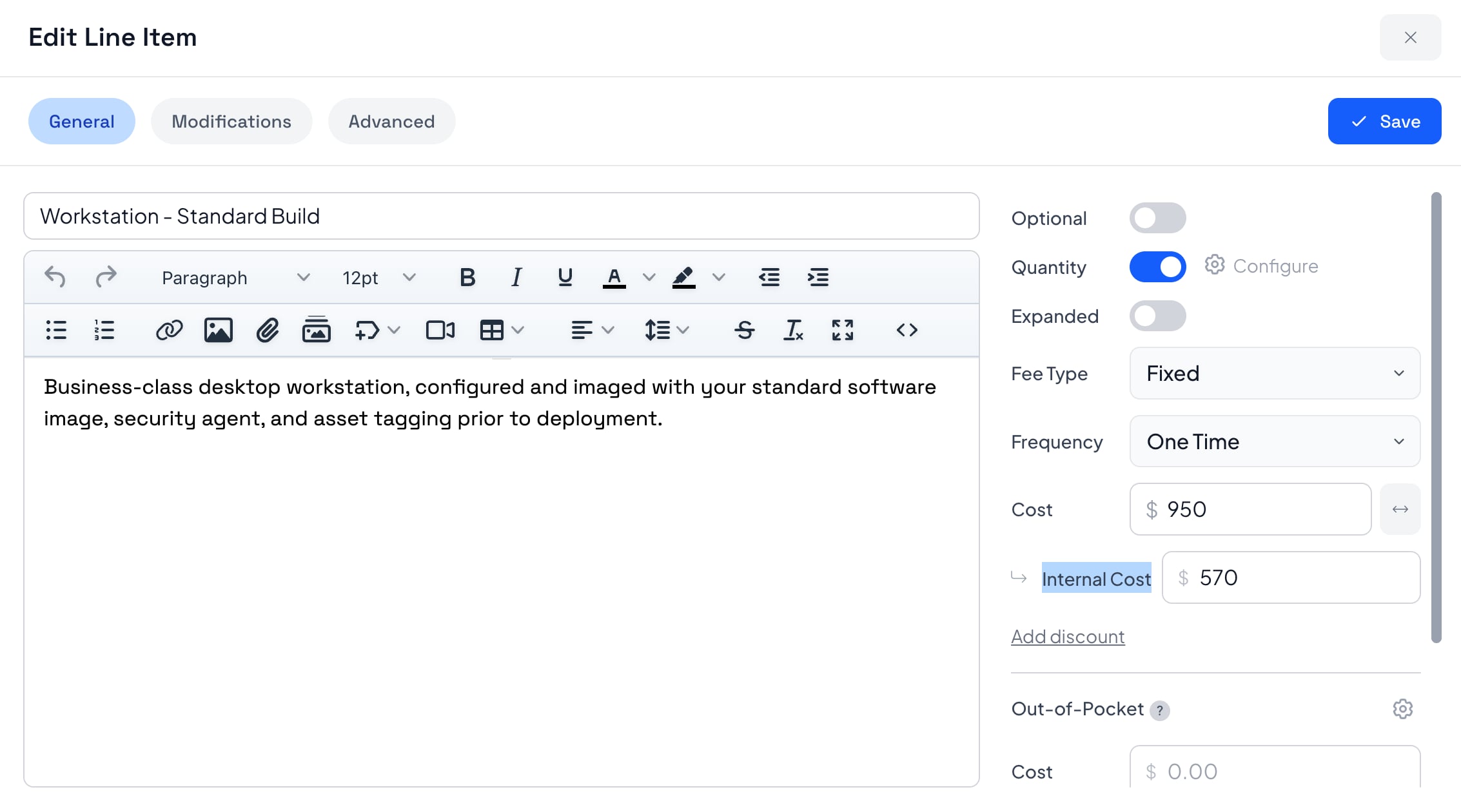
One New Field: Internal Cost
Internal Cost sits under Cost on every line item and modification. Enter what you pay, per unit when quantity applies. The client never sees it.
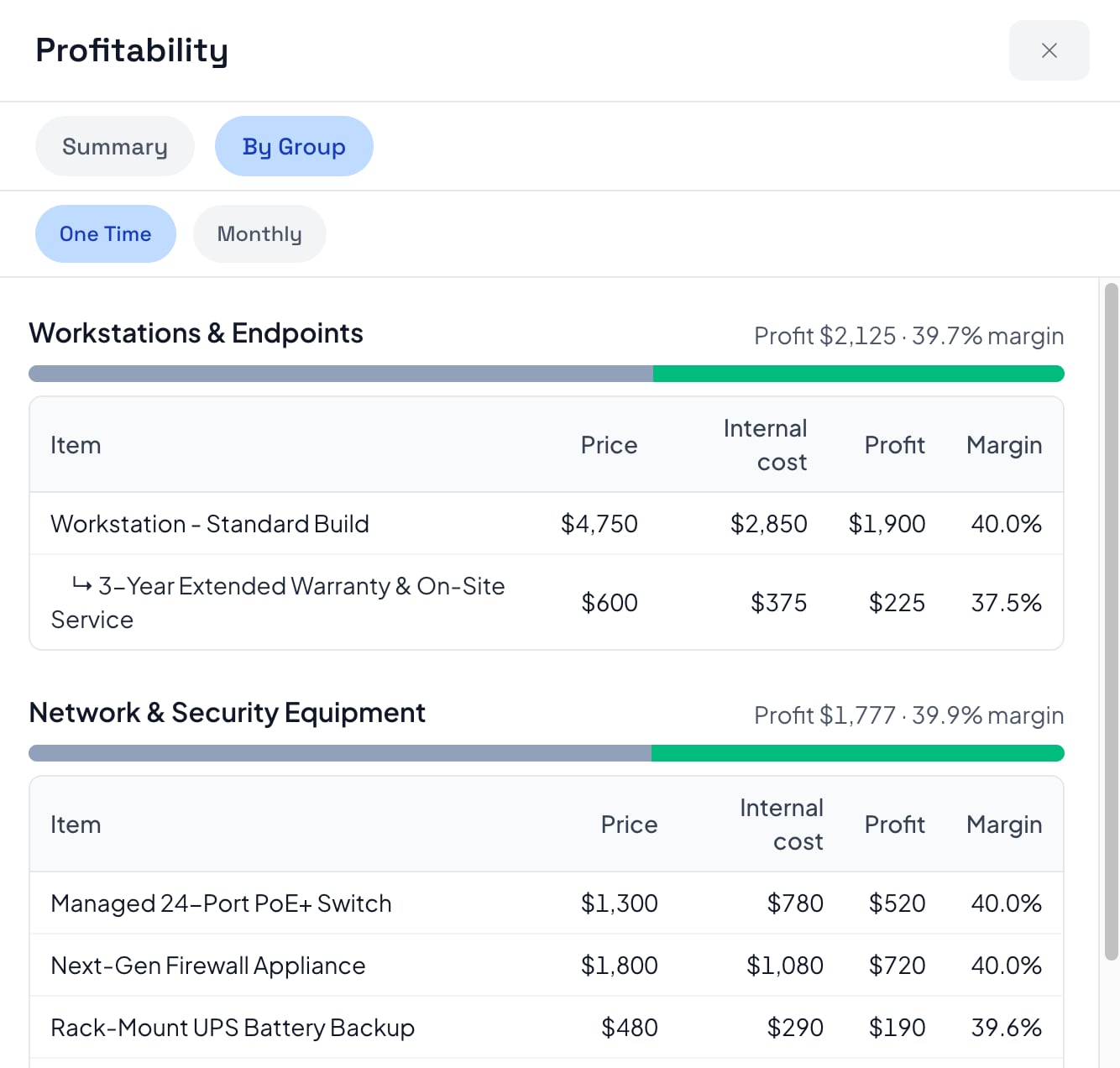
See the Margin on Every Line
Price, internal cost, profit, and margin, broken out by group. If a line is not earning its keep, you still have time to fix the price. The client never sees any of it.
One number for the whole deal
Price, cost, profit, and overall margin on a single screen. The check you run before anything goes to the client.
Find the work that is losing money
A healthy overall margin can still hide one group you are underwater on. This is where you catch it.
Setup fees stay out of retainers
One-time and monthly totals stay in their own columns, so a $7,000 setup fee never gets mixed into a $2,500 retainer.
Who Prices the Work Before They Do It?
If somebody else gets paid out of the money your client pays you, this is for you.
Marketing Agencies
Put delivery cost on each service line and see which part of the retainer is carrying the account.
IT Companies & MSPs
Enter the cost per seat and see the margin before the agreement goes out.
Consultants
Enter your internal cost and check the Summary tab before you commit to a number you cannot walk back.
Web & Development Shops
Cost each phase and see whether discovery is subsidizing the build.
Not sure this is the piece you need? Look at the rest of your pricing controls, or see how it all comes together in an interactive pricing table.
Know the Number Before You Commit to It
Margin you calculate after the project is a lesson. Margin you calculate before you send is a decision.
Cost Sits Under the Price
Internal Cost sits under the price on each line item, per unit when quantity applies.
One Screen, One Answer
Price, internal cost, profit, and overall margin on one screen, before you send.
Find the Weak Group
A healthy overall margin can still hide one group you are losing money on.
Invisible to the Client
Internal cost is stripped from what the client receives. No total, no variable, no token.
Honest on Hourly Work
Hourly items use the proposal's own rates, so cost per hour sits against rate per hour.
Off Until You Want It
A paid add-on, off until an admin turns it on in the add-ons library.
Ready to See the Margin Before You Send?
Profit Margins, Answered
Common questions about internal cost and the Profitability report in Smart Pricing Table.
Can I see profit margin on a proposal before I send it?
Enter an internal cost on the line items you want to cost, then open More and choose Profitability. The report shows price, internal cost, profit, and overall margin while the proposal is still a draft.
Does the client see my internal cost or margin?
No. Internal cost is stripped from the proposal data recipients receive. It is not on the page, not in the totals, and not available as a variable. The Profitability report is for your team only.
How is profit calculated?
Profit is price minus internal cost. Margin is that profit as a percentage of the price. Charge $2,500 for work that costs you $800 and the report shows $1,700 profit at a 68% margin. When quantity applies, internal cost is entered per unit.
Can I track margin on hourly work?
Hourly line items use the proposal's own hourly-task rates. Put your internal hourly cost in the Internal Cost field and the report works out profit the same way it does on a fixed-price item.
What if I have one-time and monthly fees on the same proposal?
They stay separate. A second row of tabs (One Time, Monthly, and so on) filters both views so a setup fee is never added to a retainer. If everything is one frequency, that row does not appear.
What is the difference between internal cost and an out-of-pocket expense?
Internal cost is what you pay, and the client never sees it. An out-of-pocket expense is a cost the client pays on top of your fee, like ad spend or a license, and it is meant to be visible. You can set both on the same item.