Volume Pricing for Quantities in Your Proposals
Yes, you can set tiered unit prices by quantity. Sell 10 seats at one price and 100 seats at another. Define the ranges once and Smart Pricing Table applies the right unit price automatically, right inside the proposal.
Your client can change the quantity themselves and watch the unit price and total update the moment they cross into the next tier. No revised quote, no spreadsheet, no back and forth.
Turn On Volume Pricing
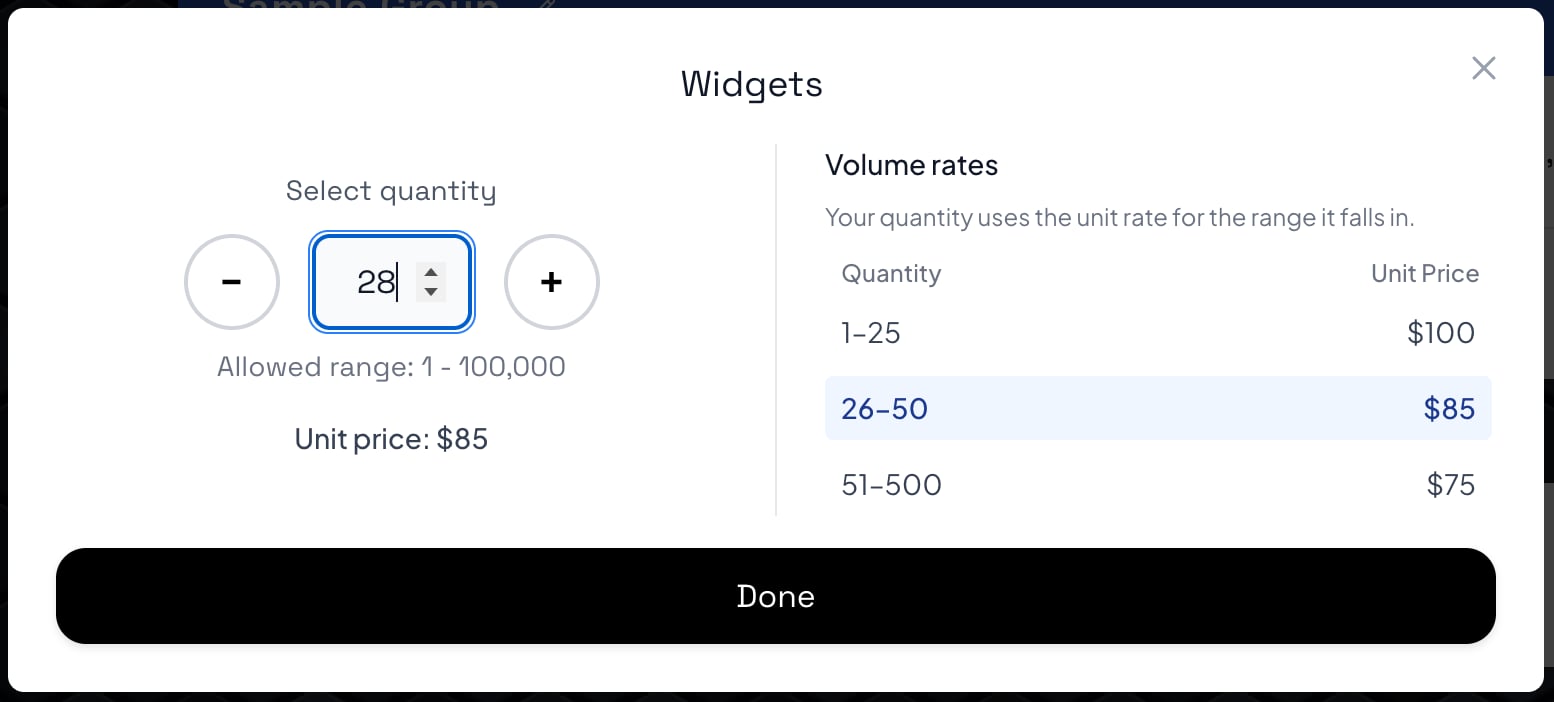
Open the quantity settings on any line item or modification and switch on Volume Pricing. A Volume Rates panel appears where you add as many ranges as the deal needs: 1 to 25 at $100 each, 26 to 50 at $85, 51 to 500 at $75.
The whole quantity uses the rate for the range it falls into, so the math stays easy to explain on a call. The first range uses that item's own cost, which keeps your volume rates in line with the rest of your pricing controls.
Decide What Clients Can Change
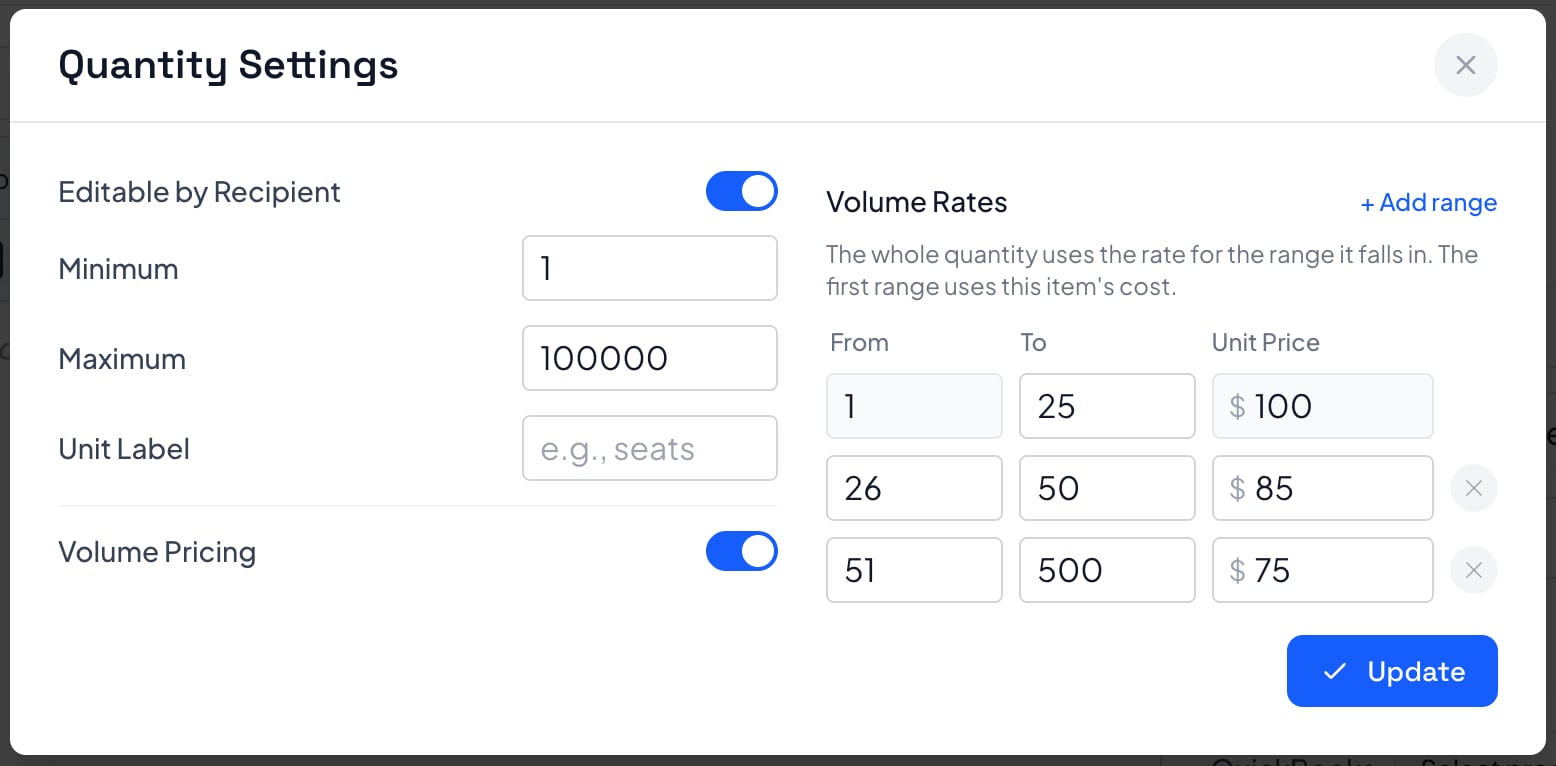
The same panel controls how the quantity behaves in your interactive pricing table. Let the recipient edit it or lock it down, set the minimum and maximum they can pick, and add a unit label like seats, licenses, or devices so the numbers read the way your business talks.
Guardrails matter on volume deals. A minimum keeps small orders profitable, and a maximum stops someone from selecting far more units than you can actually deliver.
Clear limits. Clean numbers. No surprise orders.
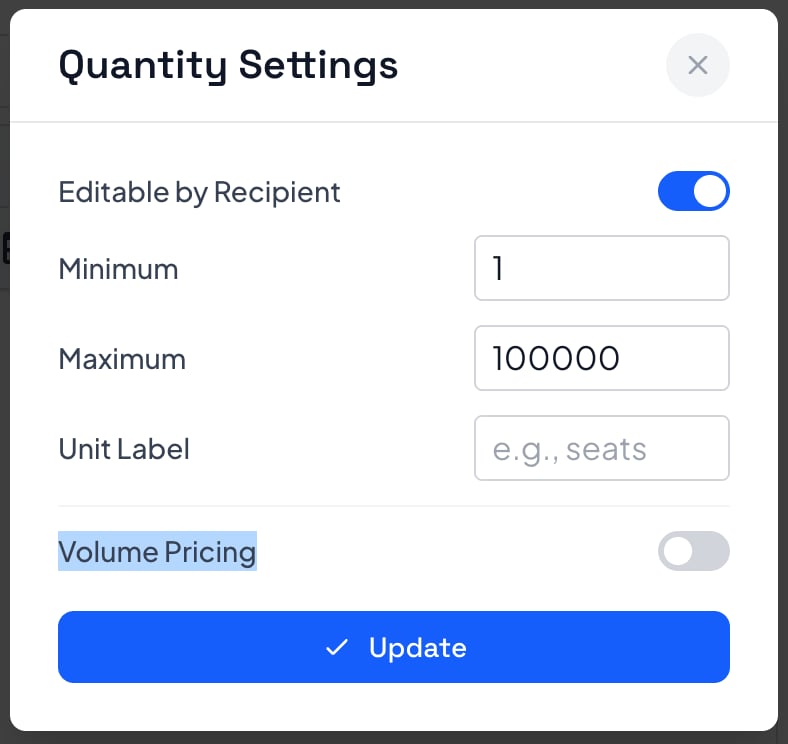
Your quantity uses the unit rate for the range it falls in.
They Always Know Which Tier They Are In
Open the quantity picker as a client and every volume rate is right there, with the current range highlighted. Choose 28 seats and the unit price reads $85, because 28 lands in the 26-50 tier.
That transparency does some of the selling for you. Buyers can see exactly what happens if they round up to the next tier, and that is often the nudge that grows the deal. When the quantity itself is still unsettled, pair volume pricing with price ranges.
Who Uses Volume Pricing?
If your unit price drops as the order grows, volume pricing belongs in your proposal. It works anywhere you sell by the seat, the license, the device, or the batch.
MSPs & Managed Service Providers
Price per seat, per device, or per user and let the rate drop as the client grows. Ideal for managed IT agreements where a volume discount is expected before you get to a signature.
IT Services & Technology Companies
Quote seats, endpoints, licenses, and hardware kits with tiered rates. The client sets the quantity that fits their rollout and the proposal prices it correctly on the spot.
Marketing & Creative Agencies
Put volume rates on countable deliverables like landing pages, blog posts, ad creatives, or product photos. One line item covers every order size instead of a rate card per package.
Consulting & Professional Services
Set tiers for training seats, workshop attendees, audited locations, or coaching sessions. Buyers can see the price break for going bigger without asking you to redo the numbers.
Billing by the hour instead of the unit? See hourly task estimates. MSPs can see how quoting fits the rest of the workflow on our MSP proposal software page.
Price Bigger Orders Without a Rewrite
Volume pricing replaces the spreadsheet you keep open next to your proposal. Here's why service businesses use Smart Pricing Table for quantity-based work.
Tiers Are Built In
Add as many quantity ranges as you need on any line item or modification. No hidden formulas and nothing to maintain outside the proposal.
Clients See Every Rate
The full rate table is visible and the current range is highlighted, so nobody has to ask what a bigger order would cost.
No Manual Recalculating
When a client asks for more seats, you do not send a new quote. They change the quantity and the totals follow the tier they land in.
Made for Seats and Licenses
Per-seat, per-device, and per-license pricing is where this shines, which is why MSPs and IT teams reach for it first.
Discounts Look Deliberate
Published tiers read as a real pricing policy. Discounts you invent on a call read as a margin you were willing to give up.
Works With Everything Else
Mix volume pricing with optional items, price ranges, hourly tasks, and monthly or annual billing in the same proposal.
Ready to Put Volume Pricing in Your Next Proposal?
Volume Pricing FAQ
Common questions about volume pricing and tiered quantity rates in Smart Pricing Table.
What is volume pricing in a proposal?
Volume pricing, also called tiered quantity pricing, charges a different unit price depending on how many units the client buys. For example, 1 to 25 seats cost $100 each, 26 to 50 seats cost $85 each, and 51 to 500 seats cost $75 each. In Smart Pricing Table those tiers live on the quantity line item, so the proposal prices the order correctly no matter which quantity the client picks.
How do I set up tiered quantity pricing in Smart Pricing Table?
Open the quantity settings on a line item or modification, switch on Volume Pricing, and add your ranges. Each range takes a From value, a To value, and a unit price. The whole quantity uses the rate for the range it falls into, and the first range uses that item's own cost so your volume rates stay consistent with the rest of the pricing table.
Can clients see which pricing tier they are in?
Yes. When a client opens the quantity picker they see the full volume rates table with the range that matches their current quantity highlighted, along with the resulting unit price. If they select 28 seats, the row for 26 to 50 is highlighted and the unit price shows $85. That removes the need to email and ask what a larger order would cost.
Does the whole quantity get the discounted rate, or only the units above the tier?
The whole quantity uses the single rate for the range it falls into. If the 26 to 50 range is $85 per unit and a client selects 30 units, all 30 units are priced at $85. This is simpler to explain on a sales call than a graduated model where each block of units is priced separately.
Who uses volume pricing in proposals?
MSPs and IT service providers use it most, usually for per-seat, per-device, or per-license pricing that improves as the client scales. Marketing and creative agencies use it for countable deliverables like landing pages, blog posts, or ad creatives. Consultants use it for training seats, workshop attendees, and multi-location engagements. Any service business whose unit price drops as the order grows can use it.
Can I limit what quantity a client is allowed to choose?
Yes. The same quantity settings panel lets you decide whether the recipient can edit the quantity at all, set a minimum and a maximum they are allowed to select, and add a unit label such as seats, licenses, or devices. A minimum protects margin on small orders and a maximum prevents someone from selecting more units than you can deliver.
Can volume pricing be combined with other pricing models?
Yes. Volume pricing works alongside optional line items, price ranges, line-item discounts, hourly tasks, percentage-based fees, and one-time or recurring billing in the same proposal. You do not need a separate quoting tool just to handle quantity tiers.