The best MSP proposal puts everything a managed-services deal actually contains, recurring retainers, per-user or per-device rates, and one-time projects like migrations or security audits, into a single clear quote, then shows the client exactly what is recurring and what is one-time before they sign.
That sounds simple. It is not, because a managed IT proposal has to do something most proposals never deal with: mix pricing models that behave differently. A static Word doc or PDF forces you to pick one and fudge the rest.
Here is how to structure a managed services proposal so the pricing is obvious, the scope is tight, and the client can say yes without a follow-up call. Smart Pricing Table is interactive proposal software built for MSPs and IT providers, so a few of the examples below use it, but the structure works no matter what tool you send from.
Why MSP proposals are harder to write than most
A marketing agency quotes a project or a monthly retainer. An MSP quotes both at once, plus optional add-ons, often in the same document. A single managed-services proposal can carry:
- A recurring monthly retainer, priced per user, per device, or as a flat plan.
- One-time project fees, like a cloud migration, network rebuild, or security audit.
- Optional add-ons, such as backup, 24/7 monitoring, or an SLA upgrade.
- Onboarding costs that only apply in month one.
Cram all of that into a flat table and the client cannot tell what hits their card every month versus what they pay once. That confusion is where deals stall.
What to include in a managed services proposal
Every strong MSP proposal covers the same building blocks. Use this as a checklist:
- Scope, in and out. Spell out what is covered and, just as important, what is not. Vague scope is the number one cause of managed-services scope creep.
- Recurring services and how they are priced. Per user, per device, or per site, stated clearly.
- One-time projects. Migrations, installs, and audits, listed separately from the retainer.
- Optional add-ons. Let the client opt into monitoring, backup, or priority support.
- Service levels and response times. Your SLA in plain language.
- Term and renewal. Contract length, renewal, and any early-termination terms.
- A clear way to accept. A signature or approval built into the proposal, not a separate PDF.
How to structure the pricing: recurring vs. one-time
This is the part that trips up most IT providers. The fix is to visually separate the two so the client reads one number for "every month" and another number for "to get started."
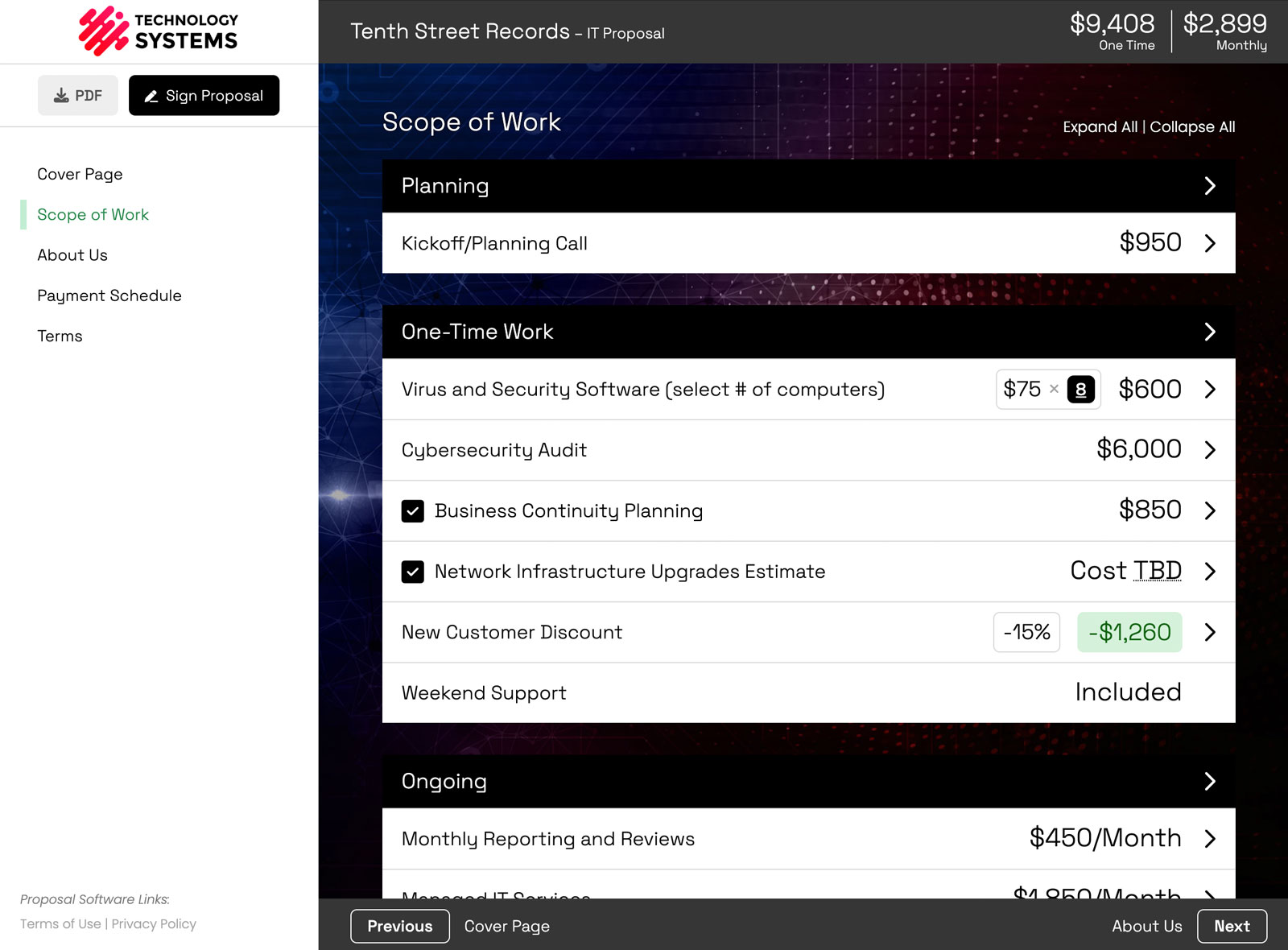
With interactive pricing controls you can group recurring line items together, keep one-time projects in their own section, and let the totals update live as the client toggles options. No spreadsheet, and no "let me send you a revised version."
A real MSP proposal example
Say you are quoting a 35-person company that needs managed IT plus a one-time cloud migration. A clean structure looks like this (numbers are illustrative):
- Managed IT Services: $85 per user per month, times 35 users, billed monthly.
- Endpoint security software: $75 per device per month, times 35 devices.
- Optional: 24/7 monitoring and after-hours support, a toggle the client can add.
- One-time: cloud migration project, a fixed fee shown in its own section.
The client sees a monthly total and a separate project total, and can turn the optional add-ons on to watch the monthly number change. You can preview a live sample MSP proposal to see exactly how that looks.
Better yet, here are two of those line items you can actually click. First, a recurring managed IT support item, priced per user. Change the number of users or toggle an add-on, and watch the monthly total move:
Now a one-time cloud migration project. Same interaction, but this is a one-time fee that stays separate from the monthly retainer above:
That is the whole point of an interactive MSP proposal: the client sees one recurring number and one one-time number, turns options on and off themselves, and never has to email you for a revised quote.
Make it interactive, and close faster
A PDF is a dead end: the client reads it, has a question, and emails you back. An interactive proposal answers the question inside the document. They toggle the SLA upgrade, see the new monthly total, and sign, all in the browser. You also get to see when they opened it and what they clicked, so your follow-up is timed instead of guessed.
MSP proposal software vs. CPQ and Word templates
Two honest distinctions worth knowing:
- Word or Google Doc templates are free and familiar, but static. They cannot separate recurring from one-time totals automatically, let clients choose add-ons, or capture a signature.
- Procurement CPQ tools (ConnectWise, Quoter, QuoteWerks) are built for hardware SKUs and distributor feeds. They are strong at sourcing product, but heavy for the client-facing services quote most MSPs actually need to send.
Smart Pricing Table sits in the middle: a fast, client-facing proposal that handles services, recurring pricing, and optional add-ons without the CPQ overhead. If you already use AI to draft proposals, you can even connect Claude or ChatGPT to build the line items for you.
Systematize it for your whole team
Once you have a managed-services proposal that works, turn it into a reusable template. Build your standard plans, backup packages, and security audits once, then have every rep assemble proposals from the same approved building blocks. Pricing and scope stay consistent, and each new quote is faster than the last.
Here is how one of our customers described the switch:
or start a free trial and build your first MSP proposal.
Explore more
Frequently Asked Questions
What should an MSP proposal include?
An MSP proposal should include a clear scope (what is covered and what is excluded), your recurring managed-services pricing (per user, per device, or flat), any one-time projects like migrations or security audits, optional add-ons the client can choose, service levels and response times, contract term and renewal, and a built-in way to sign or approve.
How do I price recurring and one-time services in the same proposal?
Group recurring line items (retainers, per-device fees, monitoring) into one section with a monthly total, and keep one-time projects (onboarding, migrations) in a separate section with their own total. Interactive proposal software updates both totals live as the client toggles optional services, so recurring and one-time costs never get confused.
How is MSP proposal software different from CPQ tools like ConnectWise or Quoter?
CPQ tools such as ConnectWise, Quoter, and QuoteWerks are built for hardware sourcing and distributor SKUs. MSP proposal software like Smart Pricing Table focuses on the client-facing services quote: recurring plus one-time pricing, optional add-ons, activity tracking, and e-signature, without the procurement overhead. Plenty of MSPs use both.
Is there a free managed IT services proposal template?
Yes. Smart Pricing Table includes a managed IT services template you can use free during a 14-day trial. You customize it in the browser and send an interactive proposal the client can review, adjust, and sign. You can also preview a live sample MSP proposal before you start.
You might also like
MSP Proposal Software: quote retainers, per-device pricing, and projects in one interactive proposal.
Sample IT & MSP Proposal: see a live interactive managed-services quote.
How to Build Proposals with AI: connect Claude or ChatGPT to draft your line items.