AI Agents · Model Context Protocol
MCP Proposal Software
Smart Pricing Table runs a Model Context Protocol server, so the AI assistant you already use can build and edit your real proposals. Not an AI writing helper bolted into our editor — your own Claude or ChatGPT, connected to your own account, doing the work.
Already know what MCP is? Jump to connecting Claude or ChatGPT or the full list of tools an agent can call.
What is MCP, and why would a proposal tool need one?
MCP — the Model Context Protocol — is an open standard for connecting AI assistants to outside tools and data. Rather than every AI product building a one-off integration with every app, an app exposes a single MCP server and any MCP-compatible assistant can use it. That is why both Claude and ChatGPT reach Smart Pricing Table through the same connection.
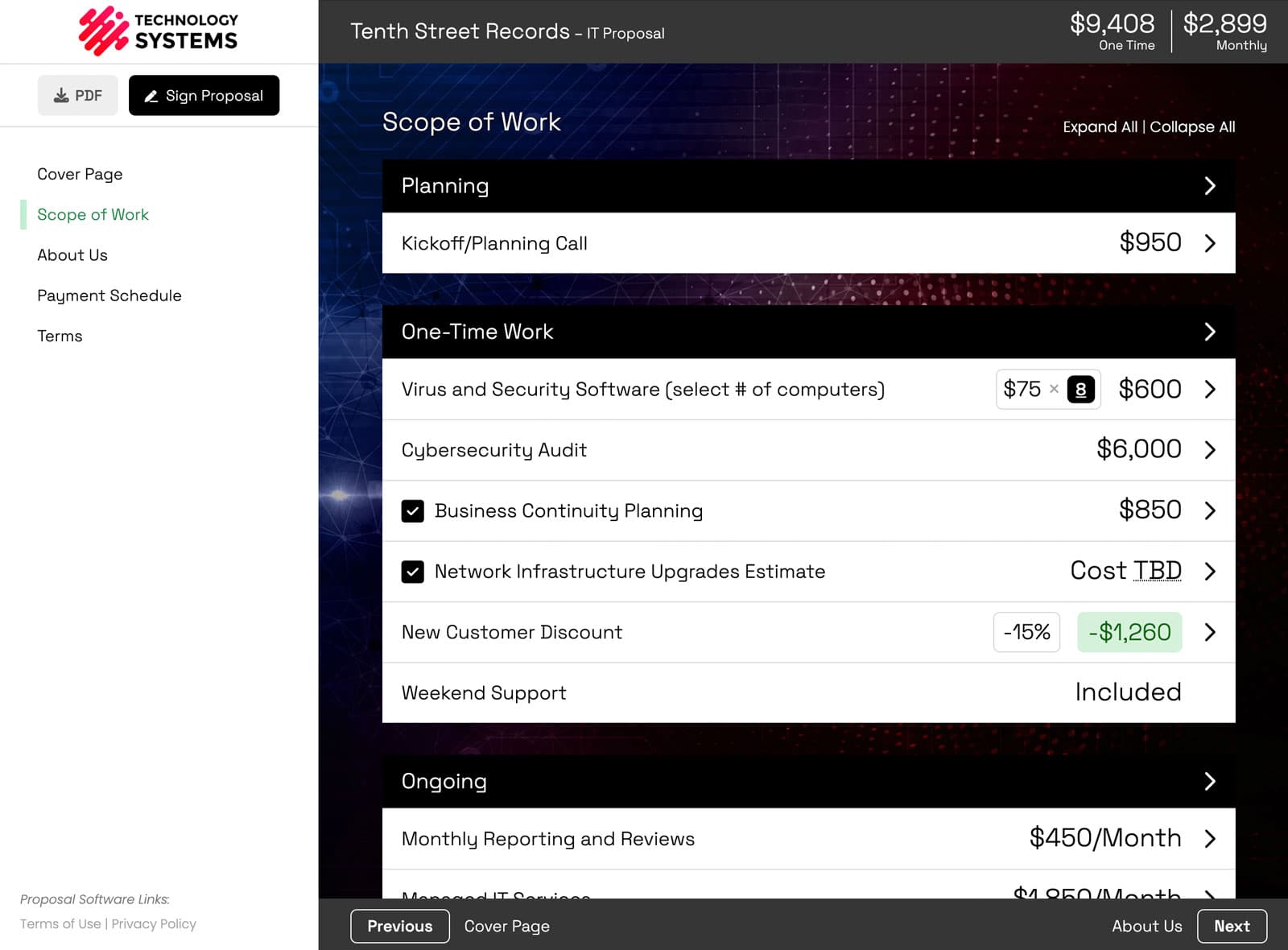
The reason it matters for proposals specifically is that a proposal is structured data, not a document — as in the one beside this. Groups, line items, quantities the client can change, optional add-ons they can tick, discounts, and recurring charges that total separately from one-time work. A chatbot that writes paragraphs cannot price a deal. An agent that reads your library and writes real line items can — so “draft a proposal for a $6k website redesign with monthly SEO at $1,500” produces an actual priced proposal at your rates, not a text blob you rebuild by hand.
It also means the work happens where you already are. If you planned the project in Claude, you do not have to stop, switch tabs, and re-enter all of it.
MCP, actually running
What the connection looks like once it’s live
This is Claude connected to a real Smart Pricing Table account over MCP — not a mockup, and not our own AI writing widget. Claude is the one doing the work; we just expose the tools it calls.
Watch what it produces: structured, priced content landing in the proposal. That is the difference between an MCP server and an “AI-powered” badge.
How to connect Claude or ChatGPT
Both start in the same place: Integrations → Agents, where you copy your connection URL.
Claude
- 1Open Integrations → Agents in Smart Pricing Table and copy your connection URL.
- 2In Claude, go to Settings → Connectors and add a custom connector.
- 3Paste the connection URL, sign in to Smart Pricing Table, and approve access to your organization.
ChatGPT
- 1Copy the same connection URL from Integrations → Agents.
- 2In ChatGPT, go to Settings → Plugins and turn on Developer mode.
- 3Under Browse plugins, choose “+” to add a custom plugin, and enter your connection URL as the Server URL with OAuth.
- 4Approve access on the consent screen, then select the Smart Pricing Table plugin on each prompt where you want to use it.
Once connected, see every tool your agent can call, or read how the AI agent integration fits into building proposals.
How to tell whether a tool really supports MCP
“AI-powered” is on every proposal-software homepage now, and it usually means something much smaller than this. Four questions worth asking any vendor, including us.
Is there an actual MCP server, or just "AI features"?
Most proposal tools ship an AI writing assistant that drafts text inside their own editor. That is not the same thing. An MCP server means your own agent — Claude, ChatGPT, whatever you already pay for — connects in and operates your account.
Can it write, or only read?
A read-only connection answers questions about your data but saves you no work. Ours reads and writes — and it reaches the parts of a proposal that actually take time: volume-pricing quantity bands, optional add-ons, require-selection rules, side-by-side comparisons, and copying a whole scope-of-work page from one proposal into another.
What is the blast radius if something goes wrong?
Ask what an agent physically cannot do. Ours cannot delete whole proposals or templates, and cannot run destructive bulk operations — those limits are in the server, not in a prompt telling the model to behave.
How narrowly is access scoped?
A connection should be bound to one organization you explicitly consent to, with tokens that expire and rotate and a revoke button you control. Ours can never reach another organization’s data, and the agent acts as you — with your role’s permissions, no more.
What “write access” should mean
Deep enough to set pricing rules, not just paste text
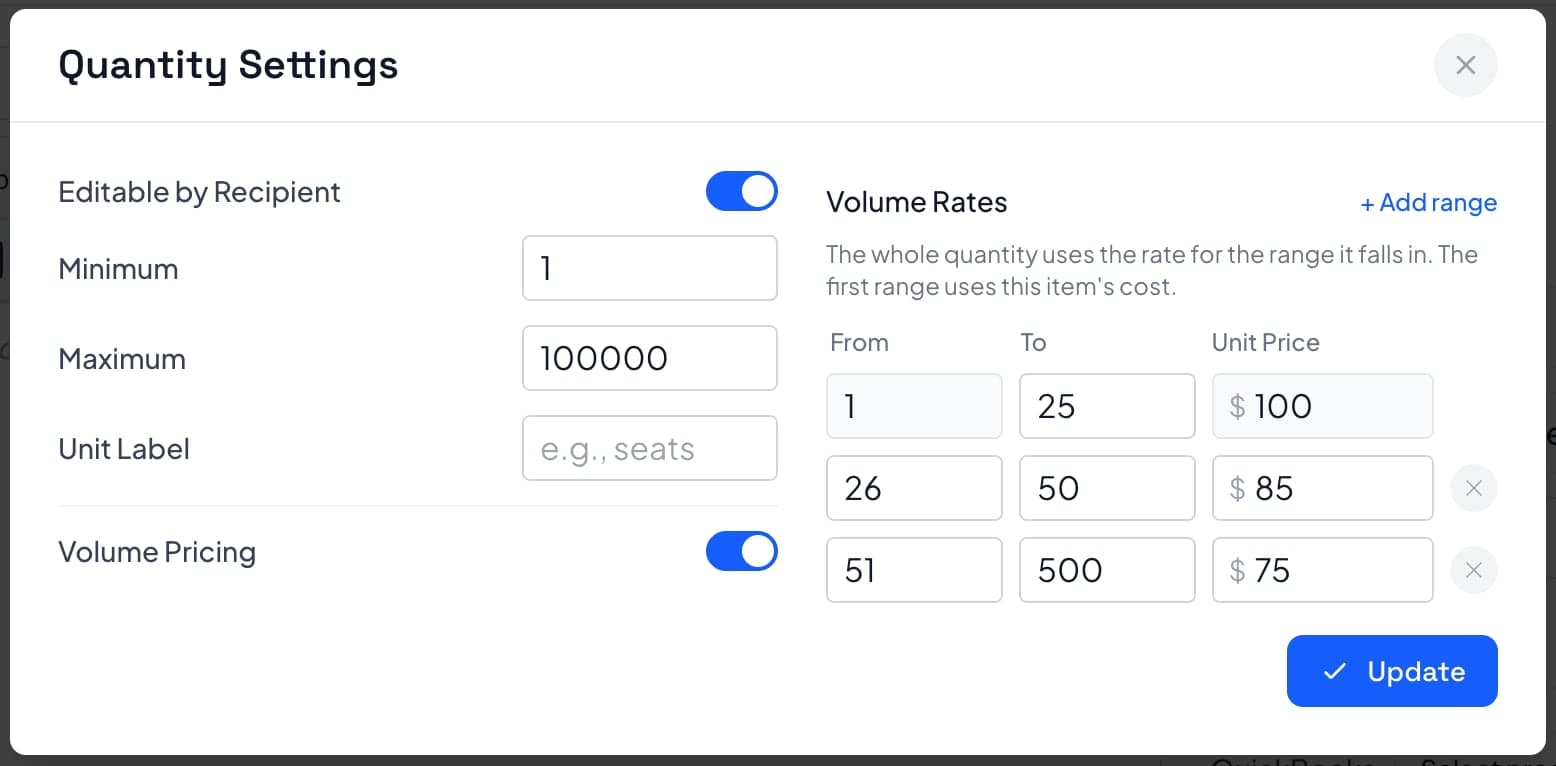
These are volume-pricing bands — 1–25 seats at $100, 26–50 at $85, 51–500 at $75. A connected agent can configure this, and the same goes for optional add-ons, require-selection rules, side-by-side options, and copying a finished scope-of-work page into another proposal. That is the depth worth asking any vendor about.
Want the answers already filled in? The vendor-by-vendor breakdown below applies these questions to all five tools, dated and sourced, including where a competitor is ahead of us.
Checking one specific competitor instead? Our comparisons cover where each stands, MCP included: Proposify, PandaDoc, Qwilr, and Better Proposals.
The landscape
Which proposal tools actually support MCP
Four of the five major proposal tools now ship something they call MCP support, and they are not remotely equivalent. One can rewrite a deal’s pricing. One can fill in a template and then never touch it again. One has a server that answers on the network and no instructions for reaching it.
We make one of these tools, so read this accordingly. What we have tried to do is make it checkable: every status is dated, sourced, and marked unverified where we could not confirm it, including where a competitor is ahead of us. Last verified August 24, 2026.
| Tool | First-party MCP server | Availability | Public setup docs | Can an agent edit an existing proposal? |
|---|---|---|---|---|
| Smart Pricing Table | Yes, first-party | Generally available | Yes, Claude and ChatGPT | Yes, including pricing structure |
| PandaDoc | Yes, first-party | Generally available since Sept 2025 | Yes | Read and write confirmed; pricing depth not verified |
| Proposify | Yes, endpoint is live | Not stated publicly | None found | Not verified |
| Qwilr | Yes, first-party | Early Access, opened Aug 12 2026 | Yes | No, per their own documentation |
| Better Proposals | No first-party server | — | — | Third-party API wrappers only |
“Not verified” means exactly that, not no. Where a vendor publishes nothing we have left the cell open rather than filling it in to our own advantage.
Why “has MCP” is the wrong question
Two vendors can both say they support MCP and mean wildly different things. It helps to think in tiers, because a buyer who asks “do you have MCP” gets a yes from almost everyone, and a buyer who asks “which tier” gets a real answer.
- Tier 0
No server, third-party bridge only
The vendor exposes an API and somebody else wraps it. Workable, but you are handing your credentials to an intermediary and depending on them to keep up.
- Tier 1
Read-only
The agent can answer questions about your data. Genuinely useful for reporting, and it saves you no time on the work of building a proposal.
- Tier 2
Generate once from a template
The agent fills variables into a template you built in advance. Fast the first time, but it cannot revise what it made, so any change means going back into the editor by hand.
- Tier 3
Create and edit content
The agent can build a document and keep changing it. This is where most of the value shows up, because real proposals get revised several times before they are sent.
- Tier 4
Create and edit pricing structure
The agent can set the mechanics that actually take the time: quantity bands, optional add-ons the client ticks, require-selection rules, side-by-side options, recurring versus one-time totals. A proposal is structured pricing, not prose, so this is the tier that removes real work.
Where the tools land. Better Proposals is at tier 0. Qwilr’s Early Access server is a tier 2 by their own description — it generates from a template and cannot edit afterwards. PandaDoc is at least tier 3, with read and write confirmed. Smart Pricing Table is at tier 4. Proposify we cannot place, because nothing published says what theirs does.
Where we are behind. PandaDoc’s server is listed in the official Model Context Protocol registry and ours is not yet, which makes theirs easier to discover from inside an MCP client. We also do not implement WebMCP, for the reasons below.
Looking ahead
What about WebMCP?
Today, an AI agent that visits a website has to work out what to do by looking at it — reading the rendered page, the underlying markup, or the browser’s accessibility tree, and guessing which button does what. WebMCP is a proposed standard that would let a site declare its tools to an agent directly, the same way our MCP server does today, but in the browser.
Where it actually stands, without the hype
- Standard status
- Proposed, from the Web Machine Learning community group. Not finalized at the W3C.
- Browser support
- Behind a Chrome origin trial — not generally available.
- Tooling signal
- Lighthouse ships three WebMCP audits under its Agentic Browsing category.
- Smart Pricing Table
- Not implemented today. Watching the standard, not the origin trial.
We are paying closer attention to this than most, because it is the browser-side version of something we have already built and shipped. But a pre-standard origin trial is not something to put in front of customers — we would rather implement it once, after the specification settles, than ship it twice. If that changes, this page changes with it.
Frequently asked questions
What is MCP (Model Context Protocol)?
MCP is an open standard for connecting AI assistants to outside tools and data. Instead of every AI product building a bespoke integration with every app, a tool exposes one MCP server and any MCP-compatible assistant can talk to it. Smart Pricing Table runs one, which is why Claude and ChatGPT can both work with your proposals through the same connection.
Which proposal software supports MCP?
As of August 24, 2026, Smart Pricing Table and PandaDoc both run generally available, documented first-party MCP servers. Qwilr has a first-party server in Early Access. Proposify has a live MCP endpoint but publishes no setup documentation for it, so we cannot say what customers can do with it. Better Proposals has no first-party server, only third-party API wrappers. Because three of those shipped inside a year, the more useful question is no longer whether a vendor has an MCP server but what a connected agent can do with it — read-only versus read and write, text versus pricing structure, and whether it can edit a proposal after it exists. The comparison further up this page breaks that down vendor by vendor.
Is an MCP server the same thing as an AI writing assistant?
No, and the difference is who is doing the work. An AI writing assistant is the vendor’s own model drafting text inside the vendor’s editor, so you still open their app and work there. An MCP server lets the AI assistant you already pay for — Claude, ChatGPT, or another MCP client — connect in and operate your account directly. Almost every proposal tool has the first. Far fewer have the second, and the two are often described with the same "AI-powered" language.
How was the vendor comparison on this page verified?
Every status was checked on August 24, 2026 against vendor documentation, help centres, changelogs, developer docs, and the official Model Context Protocol registry, plus direct probes of each vendor’s MCP endpoint and OAuth metadata to confirm a server actually responds. Where we could not confirm something, the page says it is unverified rather than treating it as an absence — we are a vendor in this comparison and unverified must not be allowed to read as no. If you find something out of date, tell us and we will correct it.
How do I connect Claude to my proposals?
Open Integrations → Agents in Smart Pricing Table to get your connection URL. In Claude, go to Settings → Connectors, add a custom connector, paste the URL, then sign in and approve access to your organization. After that you can ask Claude to build or edit proposals in plain language.
How do I connect ChatGPT to Smart Pricing Table?
ChatGPT takes one extra step than Claude does. Copy your connection URL from Integrations → Agents, then in ChatGPT go to Settings → Plugins and turn on Developer mode. Under Browse plugins, choose “+” to add a custom plugin, enter the connection URL as the Server URL using OAuth, and approve access on the consent screen. After that, select the Smart Pricing Table plugin on each prompt where you want to use it.
Is it safe to let an AI agent into my proposal data?
Connecting uses a standard OAuth approval where you consent to a single organization and to read and/or write access. The connection is bound to your user and that one organization, tokens expire and rotate, and you can revoke it at any time from the integration’s connection management. The server also refuses to delete whole proposals or templates, or to run destructive bulk operations, so those limits hold regardless of what the model is asked to do. It can never reach another organization’s data.
What permissions does the AI agent have?
The agent acts as you, with your role’s normal permissions — so an Editor can edit everyone’s proposals through the agent, exactly as they could in the app. It grants no more access than you already have. Connecting is also limited by role: Editors and Admins can set up a connection, while Viewers and Creators cannot.
Can the agent build reports the app does not offer?
Yes, and this is one of the more useful side effects. Because the agent can list and read your proposals including status, client, and totals, you can ask it for rollups and exports that are not a built-in feature — a CSV of every proposal pending signature, a breakdown by client, or your win rate over a period.
What is WebMCP, and does Smart Pricing Table support it?
WebMCP is a proposed standard that would let a website declare structured tools directly to an AI agent in the browser, rather than the agent inferring what to click from the page. It comes from the Web Machine Learning community group, is not finalized at the W3C, and is currently behind a Chrome origin trial — Lighthouse ships three WebMCP audits under its Agentic Browsing category. Smart Pricing Table does not implement WebMCP today. We are watching it closely because it is the browser-side version of what our MCP server already does, and we would rather ship it when the specification settles than chase an origin trial.
Which plans include AI agent access?
AI agent connections through MCP are available on the Team and Business plans. See the pricing page for what each plan includes.
Connect your own AI agent
Start a free trial and point Claude or ChatGPT at your account, or have us walk you through it in fifteen minutes.