Rework the Deal Without Your Client Seeing a Half-Finished Proposal
Your client asks for a smaller package. A new requirement comes up on the call. Normally that means editing the live proposal while they might be looking at it, or starting a copy and sending a brand-new link.
With version control, your client keeps seeing the current proposal while your team builds the next version. When it is ready, switch them over. Same proposal, same link, no confusion.
New Version, Same Link
No duplicate proposals to keep track of and no new link to explain to your client.
Create a New Version
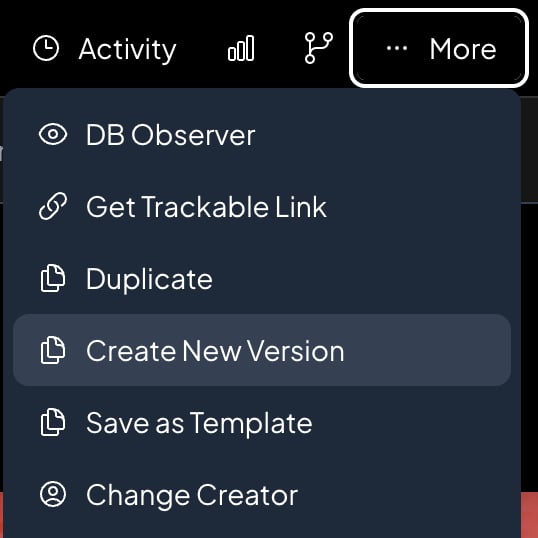
Open the proposal, click More, then Create New Version. Add a short note about what is changing so your team knows what v2 is for.
Make Your Changes
The new version is a full copy of the proposal: pages, pricing, design, and settings. Edit anything. Your client is still looking at the current version.
Switch Your Client Over
When the new version is ready, click Set as Customer Version. Your client opens the same link they already have and sees the update.

Your Client Sees One Version. Your Team Works on Another.
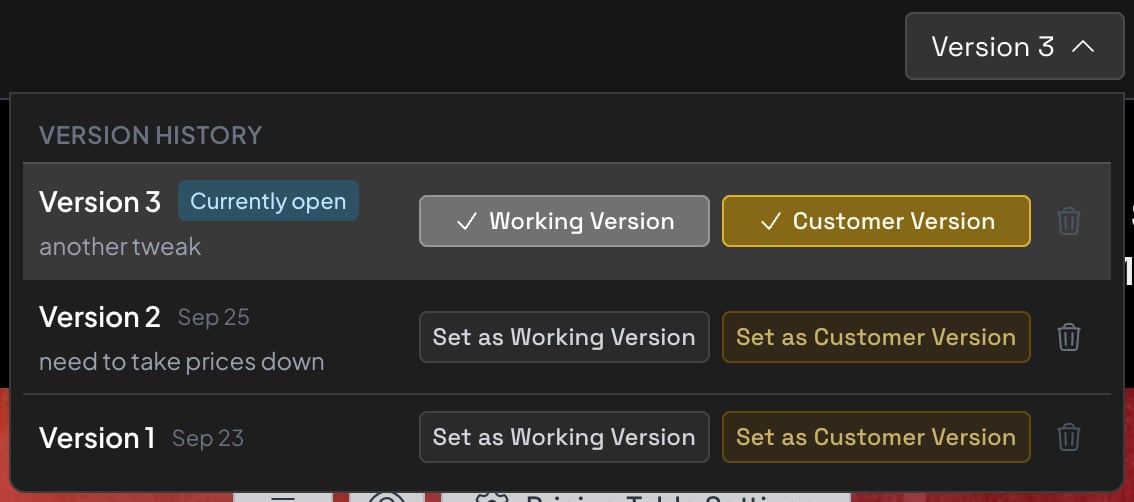
A version bar at the top of the proposal shows every version, which one your client has, and which one your team is editing.
What your client sees
The version on your client’s link. It is the one they review, sign, and pay, and the one your proposals list reports on.
- Opens from the link your client already has
- Signing, PDFs, and payments use it
- Its status shows on your proposals list
What your team is editing
The version your team opens from the proposals list. Rework the pricing, swap a package, rewrite a page, and nobody outside your team sees it yet.
- Opens when you click the deal
- A short note says what changed
- Becomes the customer version when ready
Pause the current version while you work
When you start a new version from the one your client has, you can lock it. They can still read it, but they cannot change selections or quantities, and they see a note that an updated version is on the way.
Built for Deals That Change
Proposals you never version keep working exactly the way they do today. When a deal needs a second draft, it takes a couple of clicks.
One Link for the Whole Deal
Every version shares the same proposal number and the same client link. Your client never has to dig through emails for the latest one.
Every Version Is Complete
A version is a full copy of the proposal, not a list of edits. Pages, pricing, design, and settings can all be different.
A Clean Proposals List
Your list still shows one row per deal, with the status your client sees. A small line underneath shows which version they have and which one your team is on.
Protected Once It Is Signed
When a version is out for signature, won, or lost, every version of the deal locks. Nothing changes underneath a signed proposal.
Branch From Any Version
A new version copies whichever version you have open. Go back to v1 and branch from there, or duplicate any version into its own standalone proposal.
Works With AI Agents
Connect Claude or ChatGPT over MCP and ask it to start a new version, list the versions on a deal, or make edits to the working version.
Want to see version control on one of your deals?
Most Deals Need More Than One Draft
Here is where a second version saves the most back and forth.
“Can you make it cheaper?”
Build a leaner version with fewer services while the original stays in front of your client. If they decide the first one was right after all, it is still there.
Scope Changes After the Call
Your client added two locations and dropped a service. Rework the pricing in a new version, then switch them over when the numbers are right.
Round After Round of Revisions
Keep the history of a deal in one place. Every revision lives on the same proposal instead of scattered copies named “Final v3 (2).”
Manager Review
Pair version control with an approval workflow, and every new version gets its own sign-off before your client sees it.
Version control works hand in hand with approval workflow and your interactive pricing tables, so every revision is reviewed, priced, and ready to sign. For a step-by-step walkthrough, read how to revise a sent proposal without a new link.
Revise With Confidence
Deals change. Your client should only see the version you are ready for them to see.
No Half-Finished Edits
Your client never opens the link while you are midway through changing the pricing.
No “Which Link Is Current?”
One link for the life of the deal. Your client always lands on the version you chose.
No Pile of Copies
Every revision stays on the same deal, so your proposals list stays clean and your reporting stays accurate.
The Original Is Still There
Earlier versions stay in the history. Switch back or branch from one any time before the deal goes out for signature.
Faster Revisions
Start from a full copy of what your client already saw. Change what is different and skip rebuilding the rest.
Included With Business
Version control comes with the Business plan. Proposals you do not version work exactly as they do today.
Give Every Deal Room to Change
Version Control FAQ
Common questions about revising a proposal while your client keeps seeing the current version.
What is proposal version control?
It lets you keep more than one full version of the same proposal. Your client sees one version, called the customer version, while your team edits another. When the new version is ready, you make it the customer version and your client sees it on the same link.
Will my client get a new link when I create a new version?
No. Every version shares the same proposal number and the same link. Your client always sees whichever version you set as the customer version.
Can my client see the version I am working on?
No. Your client only sees the customer version. The version your team is editing stays private until you set it as the customer version.
Can I stop my client from changing selections while I work on a new version?
Yes. When you create a new version from the one your client has, you can lock it. Your client can still read it, but they cannot change selections or quantities, and they see a note that an updated version is on the way.
What happens once a proposal is signed?
When the customer version is out for signature, won, or lost, every version of that deal locks. You cannot edit other versions or switch the customer version, so nothing changes underneath a signed proposal.
Does every proposal have versions now?
Only the ones you choose. A proposal stays a single document until you create a new version, and proposals you never version work exactly as they do today. Templates cannot be versioned.
Does version control work with approval workflow?
Yes. Approval is per version, so each new version needs its own approval before a Creator can make it the customer version.
Which plans include version control?
The Business plan. Open any proposal and click More, then Create New Version, to get started.