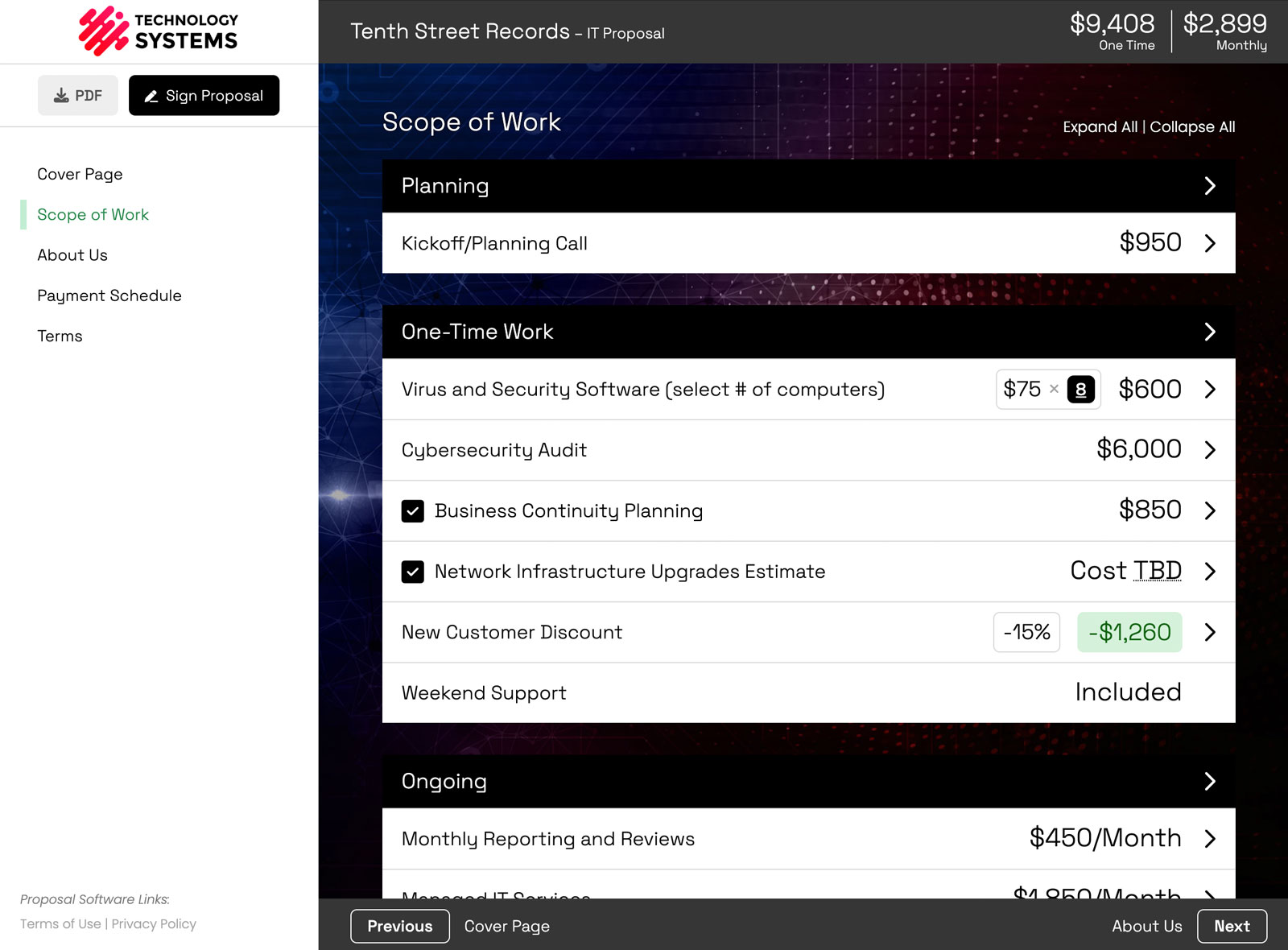
Three new features just shipped in Smart Pricing Table: Copy To, which sends a group, line item, or page straight into another proposal without a trip through your library, webhooks, which push proposal events to the other tools you run your business on, and Proposal Execution Date, a variable that fills in the date a proposal was actually signed.
You already built the content. The event already happened. The signed date already exists. All three of these stop you from recreating that work by hand.
Here is what each one does, where to find it, and who gets the most out of it.
- Copy To moves a group, line item, or page into another proposal or template
- Webhooks send proposal events to your other systems as they happen
- Proposal Execution Date injects the signed date into your contract copy
1. Copy To: move a group, line item, or page into another proposal
Copy To takes any group, line item, or page from one proposal and drops it into another proposal or template, in one step. No saving to the library first, no hunting for it on the other document.
That was the old way. Save to Library, open the other proposal, find the item, add it. Four steps for something you already had built.
How do you copy a line item to another proposal?
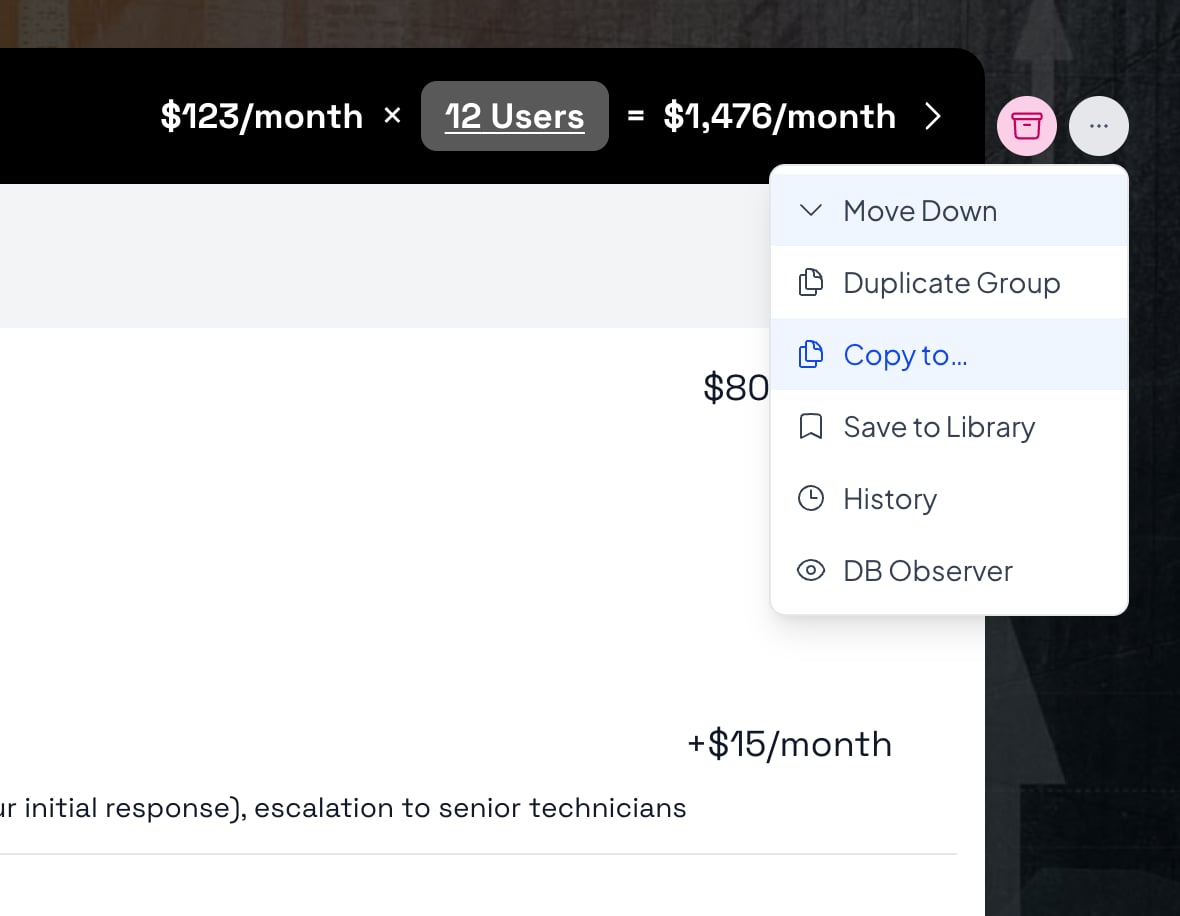
Open the more menu (the three dots) on the line item, group, or page you want, then choose Copy to...
Where does the copied content land?
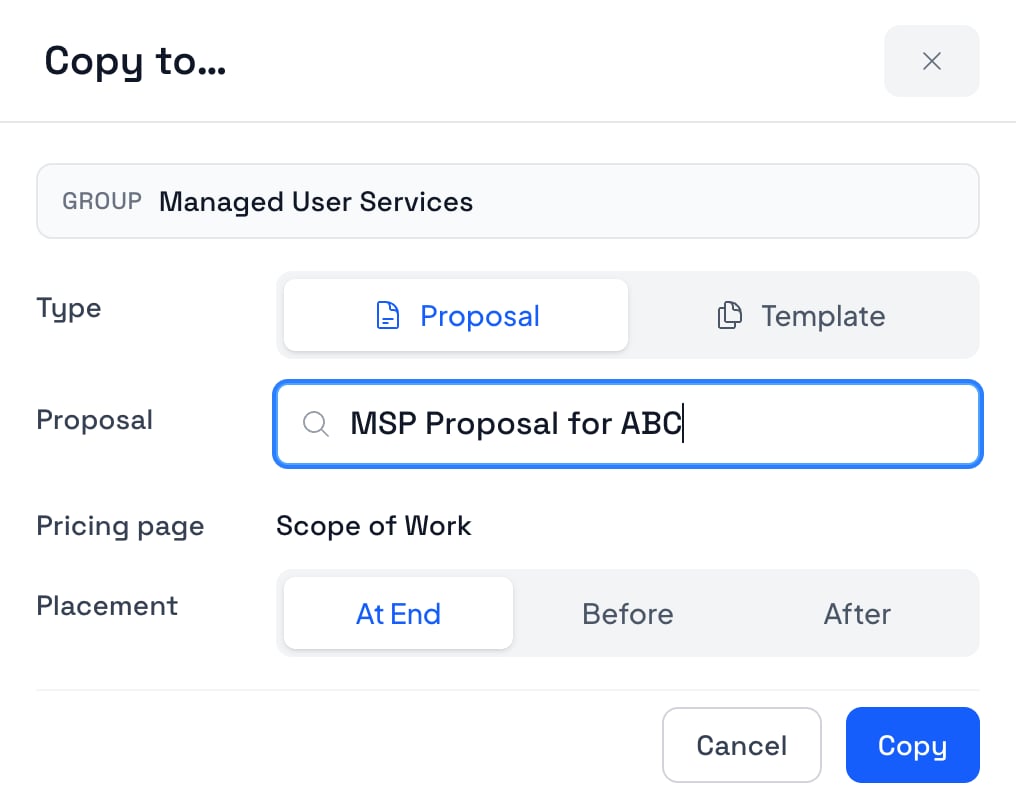
You decide, in the pop-up. Pick a Type of Proposal or Template, search for the destination by name, choose which Pricing page it goes on, then set Placement to At End, Before, or After. Hit Copy.
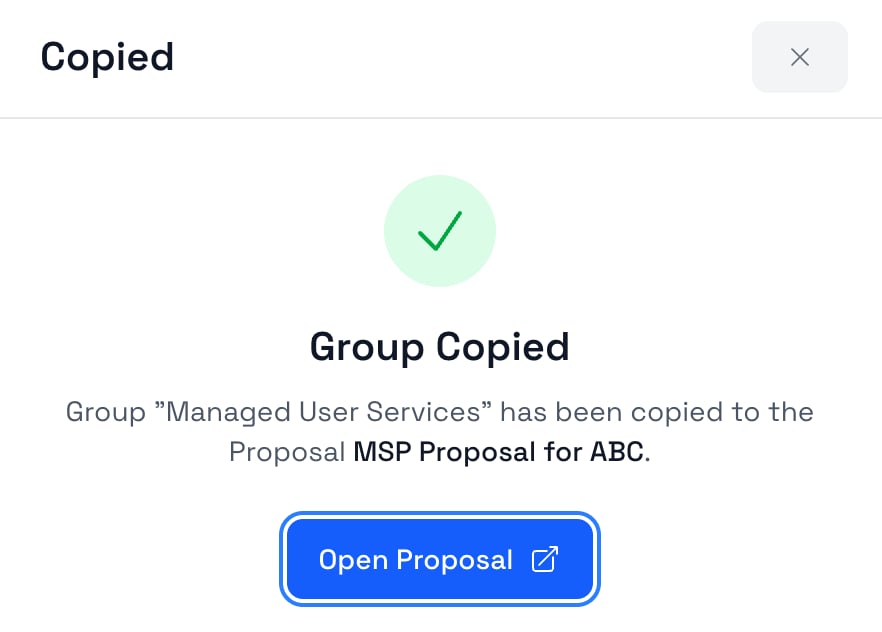
The copy happens immediately. You get a confirmation with an Open Proposal button, so you can jump over and check the placement instead of taking our word for it.
Can you copy into a proposal that has already been sent out?
Only if the destination is still editable. A proposal that is closed, pending, won, or lost will not show up as a destination, which is the point: nobody gets to quietly edit a document a client has already acted on.
Everything else is fair game, including templates. If you build a group once and realize halfway through that it belongs in your standard template, copy it there and it is ready for the next deal.
That MSP example above is not an accident. If you sell managed services, you are constantly reshaping the same handful of service groups per client, which is exactly the workflow MSP proposal software should make cheap.
2. Webhooks: send proposal events to your other tools
Webhooks let Smart Pricing Table notify another system the moment something happens on a proposal, so you stop copying data between apps by hand. This one is aimed at technical users or whoever handles your integrations.
A few things people wire up:
- Send proposal data to your invoicing system the moment a proposal is signed
- Post to Slack when a client changes a selection or a quantity
- Kick off onboarding when a proposal is marked won
How do you set up a webhook endpoint?
Go to Webhooks in your account and add an endpoint. Paste in your Endpoint URL (HTTPS is required, http is allowed for localhost while you test), give it a Description if you want one, toggle on the events you care about, and click Create Endpoint.
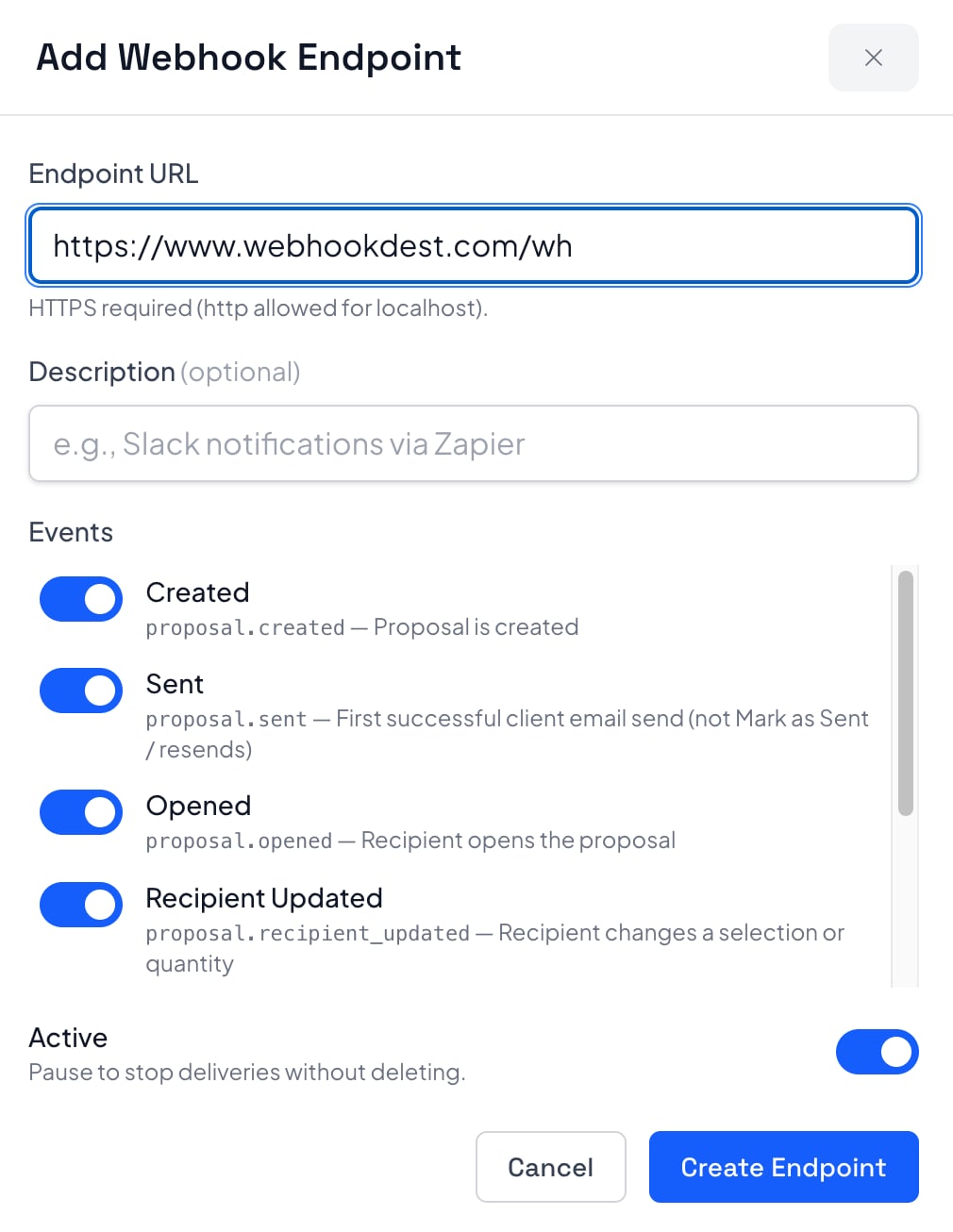
There is also an Active toggle. Turn it off to pause deliveries without deleting the endpoint, which is what you want while you are redeploying the thing on the other end.
Which proposal events can you subscribe to?
Seven, covering the life of a proposal: created, sent, opened, recipient updated, pending signature, won, and lost. Each one carries an event name you can switch on, like proposal.created, proposal.sent, proposal.opened, and proposal.recipient_updated.
Recipient updated is the interesting one. That fires when a client changes a selection or a quantity, which means you can hear about buying signals before the proposal is signed rather than after.
Are the requests secure, and what happens if your endpoint is down?
Deliveries are HTTPS POSTs signed with HMAC, so your receiver can verify the request actually came from us before it acts on it. Failed deliveries retry, and there are delivery logs so you can see what was sent and what came back.
The full breakdown of payloads, signing, and retries lives on the proposal webhooks feature page. If you would rather not write code at all, the integrations page covers the CRM and no-code routes into the same data.
3. Proposal Execution Date: the signed date, filled in for you
Proposal Execution Date is a variable that automatically prints the date a proposal was signed or accepted, so your contract's effective date is always the real one.
Before this, an effective date was a guess you typed while writing the proposal. If the client took nine days to sign, your contract said the wrong thing, and you either lived with it or edited the document after the fact.
How do you add the execution date to a proposal?
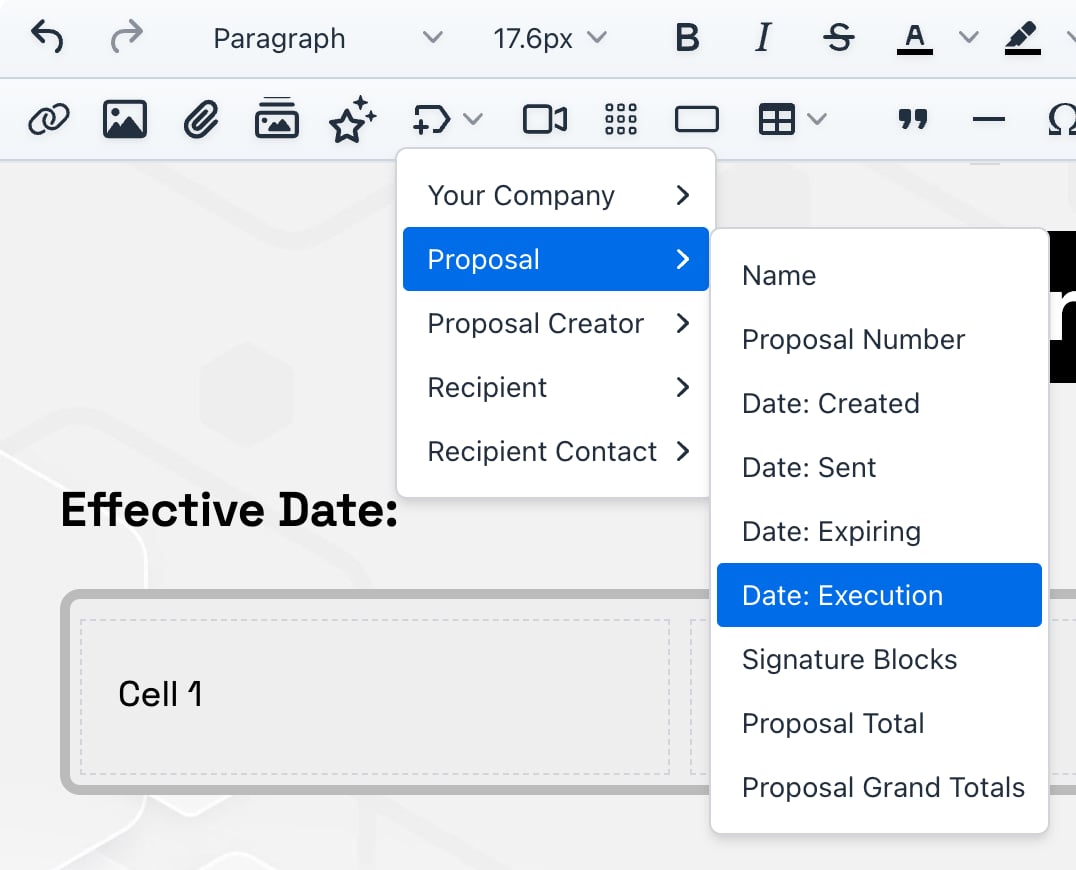
In the editor, open the variables menu, go to Proposal, and choose Date: Execution. It drops in wherever your cursor is, so put it right after your "Effective Date:" line.
What does it look like before the proposal is signed?
A chip labeled Proposal Execution Date. The underlying token is [proposal_execution_date], and it stays a placeholder for as long as the deal is open.

When does the date actually fill in?
When the proposal is accepted, fully signed, or marked won. At that moment the chip resolves to the real date and stays there.
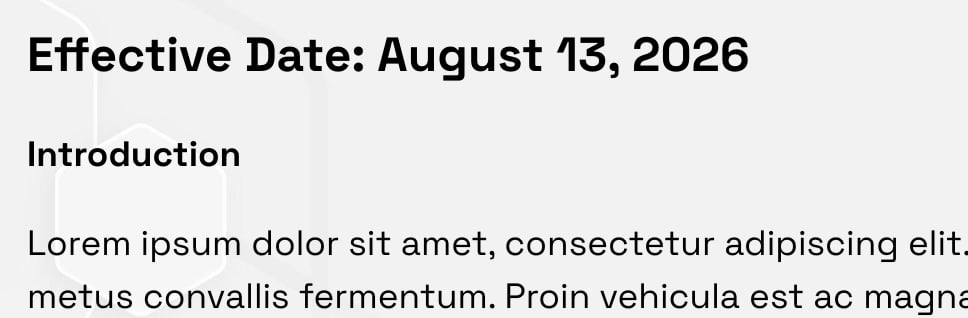
"Fully signed" matters if you use countersignatures. The date reflects when the agreement was actually executed, not when the first person got to it.
Use it anywhere your terms reference a start date: the effective date line, a term that runs twelve months from execution, a notice period, a payment schedule that begins on signing. Then stop thinking about it.
What these three have in common
None of them are glamorous, and that is fine. Each one removes a version of the same chore: recreating something that already exists. The group you already built. The event that already happened. The signature date that is already recorded. Smart Pricing Table is interactive proposal software with live pricing tables for agencies, IT companies, and consultants, and a lot of what we ship looks exactly like this. Find the step you are doing by hand for no reason, then delete it.
All three are live in your account now. Nothing to enable, nothing to request. If you missed the last round, here are the volume pricing, email templates, and custom variables updates.
or start a free trial and try it yourself.
Explore more
Signed events when a proposal changes
CRM, API, and the rest of your stack
Volume pricing, email templates, variables
Frequently Asked Questions
What is Copy To in Smart Pricing Table?
Copy To is an option in the more menu on any line item, group, or page that copies it directly into another proposal or template. It replaces the old two-step workaround of saving the content to your library and then adding it from the library on the other document.
How do I copy a line item from one proposal to another?
Open the more menu on the line item, group, or page and choose Copy to... Then pick a Type of Proposal or Template, search for the destination by name, choose the pricing page it should land on, set Placement to At End, Before, or After, and click Copy. The copy is instant and you get an Open Proposal button to check it.
Can I copy content into a proposal that is already closed or won?
No. The destination has to still be editable, so proposals that are closed, pending, won, or lost do not appear in the destination list. This keeps anyone from changing a document a client has already signed or acted on.
What are proposal webhooks?
Proposal webhooks are automatic messages your other systems receive when something happens on a proposal, such as it being created, sent, opened, updated by the recipient, pending signature, won, or lost. They are HTTPS POST requests signed with HMAC, with retries and delivery logs, so you can trigger invoicing, Slack alerts, or onboarding without moving data by hand.
How do I set up a webhook in Smart Pricing Table?
Open Webhooks under integrations in your account, add an endpoint, and paste in your Endpoint URL. HTTPS is required, though http is allowed for localhost while you test. Toggle on the events you want, leave Active on, and click Create Endpoint.
What is the proposal execution date and when does it fill in?
The proposal execution date is the date a proposal was signed or accepted. Insert it from the variables menu under Proposal as Date: Execution, and it shows as a Proposal Execution Date chip until the proposal is accepted, fully signed, or marked won. At that point it fills in with the real date, which makes it the right variable for a contract's effective date.
You might also like:
👉 3 New Features: Volume Pricing, Email Templates, Custom Variables
👉 How to Put a Proposal On Hold (Without Marking It Lost)
👉 How to Add Proposal Numbers to Track Every Deal